



MongoDB can be much faster than traditional databases when used correctly. Key parts include how you model your data and whether you are using indexes.
When your queries are slow, the culprits are usually found between these two topics.
Let’s say you import JSON data into a new collection you just created, and then you start querying it.
Without available indexes for the query, MongoDB must do a collection scan, meaning that it needs to read, for every query, every time, all the documents from the collection to identify the ones you requested. You may not notice a difference when you have a few documents, because WiredTiger, the MongoDB engine, keeps as many requested documents as possible in its cache.
Once you have a large set of documents, though, the collection scans will start to take a long time to run and use more and more CPU, disk, and RAM resources.
Another cause of slowdowns and excessive resource usage is the so-called in-memory sort: when you apply a sort stage to a query, without an index that supports it, MongoDB is forced to sort those results in RAM before returning them. Even worse, if the data to be sorted exceeds 100MB in memory (32MB before MongoDB 4.4), MongoDB will throw an error (Sort exceeded memory limit), forcing you to add an index or use allowDiskUse (not recommended for performance). And this, again, is done for every query, every time.
When the collection has indexes, MongoDB checks whether they are fit for the query, analyzing all of them and choosing the one that might give the best performance. When it finds an index that fits only partially, it will use it if there are no alternatives, but the performance won’t be optimal.
In this article, we will learn how to construct indexes so they fit a query shape perfectly and give you the best result.
Last but not least, slow queries are not always due to a lacking index fault. Proper data modeling is also important: keep in mind that MongoDB is not a relational database, so the improper use of lookups (the MongoDB “joins”), documents containing huge arrays, and a lack of projections, for example, might slow down your queries. Data modeling is outside the scope of this article, and for that, we recommend reading the Data Modeling Best Practices section in the MongoDB documentation and the great Building with Patterns article series from the MongoDB official website.
How to use indexes like a pro
In most cases, a MongoDB query uses only one index per collection. However, MongoDB can also combine multiple indexes using index intersection to fulfill a query, though in real-world workloads it is almost never chosen by the query planner. For simplicity and optimal performance, designing a single compound index that covers your query is still the best practice. This is an important concept: you should always start from the query to define an index, and not vice versa.
Indexes are special data structures that store a small portion of the collection’s data set in an easy-to-traverse form. MongoDB indexes use a B-tree data structure.
The index stores the values of a specific field or set of fields, ordered by the value of the field. The ordering of the index entries supports efficient equality matches and range-based query operations. In addition, MongoDB can return sorted results using the ordering in the index.
Although indexes improve query performance, adding an index has a negative performance impact for write operations. Each insert or update operation must also update the collection indexes, so we have to be careful and create only the necessary ones.
Stick to the principle: “Every query should use an index – and every index should support a query”.
There are different kinds of indexes, some are for specific use cases (Geospatial, TTL, Full Text, Wildcard, Hashed), but for now, we will focus on Single Field and Compound indexes.
Single-Field indexes are the simplest form: they only index one field, so they are useful only for simple queries. You can create a single index visually in Compass, or Atlas Data Explorer, as well as in Studio 3T IDE, or using the Mongo Shell createIndex command:
db.<collection>.createIndex( { <field>: <sort-order> } )The sort order can be 1 (ascending) or -1 (descending). For single-field indexes, though, the direction is irrelevant since the index B-Tree can be traversed from either the beginning or the end.
If you haven’t noticed, you can already find a single index on every collection you create: it’s the index on _id field, and it’s created by default. The _id field is the document’s primary key and must always be there and unique for each document in the collection. The index itself enforces the uniqueness of the field thanks to the unique option. You can create other unique indexes in the collection like this:
db.<collection>.createIndex( { <field>: <sort-order> }, { unique: true } )Compound indexes are by far the most used indexes, since queries themselves rarely involve only one field.
To create a compound index, you just list all the fields you want to add to the index (up to 32) using the same createIndex syntax:
db.<collection>.createIndex( { <field1>: <sort-order>, <field2>: <sort-order>, <field3>: <sort-order>, [...] } )The main difference with single indexes is that the order of the fields and the direction are very important and determine the efficiency of the index itself.
The ESR (Equality – Sort – Range) guideline determines the best order for the fields in the compound index and is a fundamental rule to follow:
- Put the equality fields first. “Equality” refers to an exact match on a single value. Index searches make efficient use of exact matches to reduce the number of index keys examined.
- After Equality fields, you should put the fields with which you sort the query, if any. This will avoid in-memory sorts.
- At the end of the index, put the Range fields.
Range predicates are $gt, $gte, $lt, $lte (less/greater than with or without equal), but also $ne (not equal), $regex (regular expression), and $nin (value not in specified array). The $in predicate is considered an equality operator when used without sort, otherwise it is a range operator.
To improve query efficiency, limit the range bounds and use equality matches to reduce the number of documents to scan.
The ESR rule is usually seen as the golden rule. There may be some cases when our range predicate (e.g., timestamp) drastically reduces the result set before sorting, so that placing it before the sort field (thus becoming ERS), can be more efficient than ESR.
Choose whether to use a sort or range field next based on your index’s specific needs:
- If avoiding in-memory sorts is critical, place sort fields before range fields (ESR)
- If your range predicate in the query is very selective, then put it before sort fields (ERS)
A more comprehensive guideline could be: Equality first, then the field that reduces the result set the most, then the sort field.
Key points to remember:
- In compound indexes, order is important! Follow the ESR rule.
- You should always ensure that equality fields always come first. Placing equality fields first keeps the remaining index fields in sorted order.
- Order direction is also important in a compound index: for a query to use it for sorting, the direction for all keys in the cursor.sort() must match the index key pattern or match the inverse of the index key pattern. For example, an index on { a: 1, b: -1 } can support a sort on { a: 1, b: -1 } and { a: -1, b: 1 } but not on { a: -1, b: -1 } or {a: 1, b: 1}.
- MongoDB can use the same index for different queries if the fields of those queries correspond to a prefix of the index. For example, an index created like this: { a: 1, b: 1, c: 1 } can support queries on a, b, c, but also on a, b, and on a.
Note: while a query can filter using a prefix of a compound index, to avoid an in-memory sort, the sort fields must be contiguous with the filter fields in the index definition.
How to diagnose (and cure) a slow query
Here we will go more practical showing you an example of a slow query and how to fix it. If you want to work on it, any MongoDB local installation or an Atlas Free cluster would work, together with Studio 3T Desktop Query Profiler and Index Manager. If you decide to use Atlas and haven’t already signed up for one of these, you can go to https://www.mongodb.com/cloud/atlas/register and get one. It’s a free, fully functional, fully managed 3-node replica set for you to use as you wish.
Single indexes
When developing an application that uses MongoDB, you usually start storing data in a collection that has no indexes (except for the default one on the _id field): if you try a query on any other field than that, MongoDB will perform a slow and expensive collection scan.
As an example we will use the Sample Training Dataset you can find here: https://www.mongodb.com/docs/atlas/sample-data/sample-training/#std-label-sample-training.
This sample database contains a company collection that holds data about 9,500 companies.
Let’s try with a simple query, just one field:
use sample_training
db.companies.find({ founded_year: 2007 })
To monitor what the query is actually doing, you would append the explain command, specifically asking for the execution statistics, to the find command.
db.companies.find({ founded_year: 2007 }).explain("executionStats")A JSON object containing detailed information about the query execution is returned. Keep an eye on some key metrics:
executionStats: {
    executionSuccess: true,
    nReturned: 1159,
    executionTimeMillis: 37,
    totalKeysExamined: 0,
    totalDocsExamined: 9500,
    executionStages: {
      isCached: false,
      stage: 'COLLSCAN',
    [...]
If you’re using Compass, there is a handy “explain” button next to the query text box. An “Explain plan” would, showing you a diagram of the stages the query used to get the results.
As you can see, the stage used is a COLLSCAN (Collection scan), meaning it has not used any index. In Compass, the Explain Plan Query Performance Summary is also explicitly alerting about that.
The summary gives us important information about the query behaviour.
Aside from the execution time (37ms in this case), there are three important numbers to look at to be able to understand what is happening:
- 0 keys examined: no index keys have been used for this query (since we don’t have an index for that)
- 9500 documents examined: all the documents in the collection have been read from the disk and examined
- 1159 documents returned: these are the documents returned by the query
As you can see, this query is very inefficient for a number of reasons: no index keys are used, a lot of documents are read from the collection compared to the number of documents returned.
Let’s try adding an index on founded_year and see what changes it makes.
db.companies.createIndex( { founded_year: 1 } )Let’s try running the query again with Explain. The total execution time is now gone from 35ms to 2ms (17.5x faster)!
If you check the execution stats again:
executionStats: {
    executionSuccess: true,
    nReturned: 1159,
    executionTimeMillis: 2,
    totalKeysExamined: 1159,
    totalDocsExamined: 1159,
    executionStages: {
      isCached: false,
      stage: 'FETCH',
      nReturned: 1159,
      executionTimeMillisEstimate: 2,
      [...]
      inputStage: {
        stage: 'IXSCAN',
[...]- 1159 keys examined
- 1159 documents examined
- 1159 documents returned
These three numbers being equal means that the query ran in the most efficient way possible, because it looked up the required index keys (IXSCAN – Index Scan – stage), then it went to the collection to get exactly the documents identified by the index without reading them (FETCH stage) and returned them.
Compound indexes
Now let’s try something more complex.
We need to get the top 10 companies (by number of employees) founded between 1990 and 2010 in the “games_video” category.
The query would be something like:
{category_code: "games_video", founded_year: {$gte: 1990, $lte: 2010}}Then we need to add a sort stage like:
{number_of_employees: -1} and a limit of 10.
The final query would be:
db.companies.find({
  category_code: "games_video",
  founded_year: {$gte: 1990, $lte: 2010}
}).sort({
  number_of_employees: -1
}).limit(10).explain("executionStats")
Result:
executionStats: {
    executionSuccess: true,
    nReturned: 10,
    executionTimeMillis: 13,
    totalKeysExamined: 6272,
    totalDocsExamined: 6272,
    executionStages: {
      isCached: false,
      stage: 'SORT',
      nReturned: 10,
      [...]
      inputStage: {
        stage: 'FETCH',
        [...]
        },
        nReturned: 421,
        [...]
        inputStage: {
          stage: 'IXSCAN',
          nReturned: 6272,
  [...]
What happened here?
MongoDB used the index that we created earlier: the field founded_year is in the query, so it managed to use that index even if it does not cover the query perfectly.
The numbers in the summary explain the situation:
- 6272 keys examined
- 6272 documents examined (421 actually fetched before applying the limit)
- 10 documents returned
Moreover, the documents are sorted in memory (because the index does not contain number_of_employees), as you can see from the existence of the SORT stage.
This time, MongoDB had to scan 6272 index keys, then examine all corresponding documents to select the 421 documents that matched the other query parameters, sort these documents in memory, and finally limit them to the first 10 results.
As expected, the FETCH stage is the most expensive in terms of execution time as it has to examine all the 6272 documents from the disk.
Let’s improve that. We will create a compound index that includes all the query and sort fields, following the ESR rule to establish the order:
- category_code (Equality field)
- number_of_employees (Sort field): here we must set the direction to -1
- founded_year (Range field)
db.companies.createIndex( { category_code: 1, number_of_employees: -1, founded_year: 1 } )
Let’s try that query again.
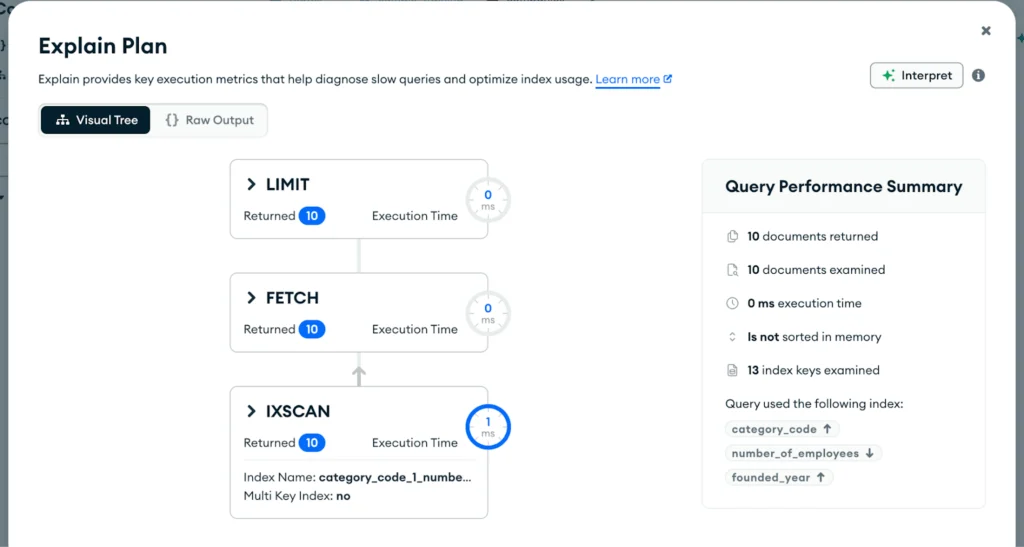
Not bad…
- 10 keys examined
- 10 documents examined (10 actually fetched)
- 10 documents returned
- No sorting in memory
And the execution time? Down to 1ms. A 13x improvement!
Note that the keys examined are exactly 10: the limit operation has been applied much earlier in the execution plan, in the first IXSCAN stage, because the results were already sorted in the index! So there was no need to fetch all 421 documents that matched the query prior to limiting the number.
Test your indexes: hint and hide
If you need to test new indexes within an existing application, you can force MongoDB to use a certain index by using the hint command at the end of the query:
db.collection.find({field1: "value"}).hint("index_name")Specify the index either by the index name or by the index specification document. In Compass, there is a hint option in the query form.
You can also hide certain indexes if you don’t want MongoDB to use them. This is especially useful when testing the introduction of new indexes without deleting the old ones. Creating indexes on large collections can be a resource and time-consuming process, even if it is executed in the background, so you might temporarily hold on to the old index before deleting it.
db.collection.hideIndex("index_name")Specify the index either by the index name or by the index specification document. In Compass, there is a hide button next to each index in the indexes tab. On Studio 3T Desktop you can hide the index in the Index Manager tab using the context menu.
Conclusion
MongoDB queries can be wicked fast! You just needed to unlock the indexes “secrets”.
You have learned how to significantly improve your query performance by correctly implementing indexes.
In compound indexes, the order is very important (ESR!) and can determine the efficiency of an index scan. The best index would scan the exact number of keys that are needed for the query to be successfully executed. It is also very important to include the sort fields in your indexes to avoid sorting the results in memory.
Key takeaways
- Avoid collection scan!
- Only create indexes as necessary to support specific queries
- Compound indexes can be used for different queries
- Remember the ESR rule and add sort fields to your indexes
FAQs
- Why is my query slow?
90% of the time, there is an issue with your existing indexes, or you lack the proper index. With this tutorial, you will learn fundamental concepts about indexes, and your queries will never be the same again! - Do I need to index everything?
Create indexes as necessary. Start from what the application needs: indexes introduce a performance penalty on writes because every index must also be updated. The more indexes you have, the slower the writes become, so you should always monitor your write performance when adding many indexes.
You cannot create more than 64 indexes per collection, but stay far away from that number! An ideal number would be between 4 and 10.
- Will indexes fix every performance issue?
Not everything. There can be some issues in your data model or how you are using your collections (too many lookups, huge arrays, big flat document structures). Have a look at data modeling design patterns and best practices documentation (linked in this article) to design document schemas like a pro!


