


Date tags are placeholders for different date operations relative to when a query is run. Date tags make date fields easier to work with by saving you from having to perform calculations with the MongoDB Date() function.
Studio 3T converts the date tags when the query is run into the appropriate MongoDB query, using greater than and less than operators to cover the calculated time range.
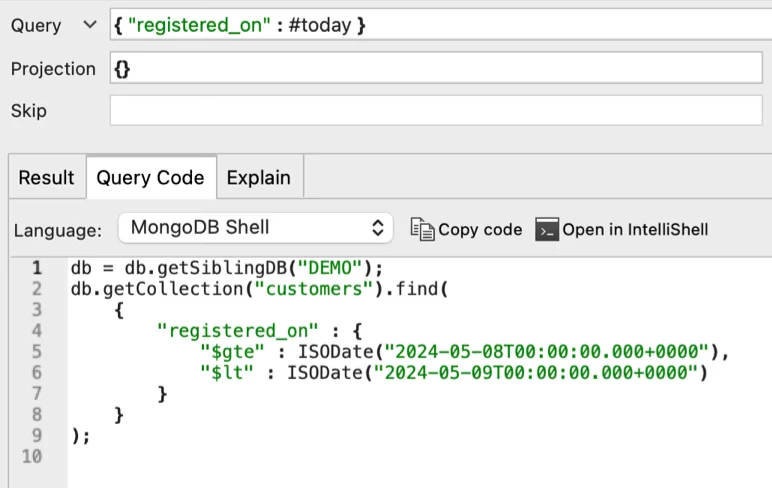
For example, in the screenshot above, the query
expands into
and the range is automatically updated when that query is run, to reflect the time and date of that run.
Where can Date tags be used?
You can use Date tags in the Collection tab’s Query bar, IntelliShell, Visual Query Builder, in the Aggregation editor when creating a $match stage, and in find and aggregation queries used in Exports.
Relative Date Tags
| Tag | Definition |
|---|---|
| Hour-related tags | |
| #nextNhours | Within the next N hours from now |
| #nexthour | Within the next hour |
| #lastNhours | Within the last N hours up to now |
| #lasthour | Within the last hour |
| General past / future tags | |
| #uptonow | Any time before now (“in the past”) |
| #fromnow | Any time from now (“in the future”) |
| #aftertoday | Any time after today |
| #beforetoday | Any time before today |
| Days-related tags | |
| #today | Any time today |
| #yesterday | Any time yesterday |
| #tomorrow | Any time tomorrow |
| #nextNdays | The rest of today + the next N calendar days |
| #nextNcaldays | The next N calendar days following today |
| #lastNdays | the last N calendar days + the start of today until now |
| #lastNcaldays | The last N calendar days before today |
| Weeks related tags | |
| #nextNweeks | The rest of today + the next N weeks – equivalent to #nextN*7days |
| #nextNcalweeks | The next N calendar (Mon-Sun) weeks after the current calendar week |
| #nextweek | The next week – the rest of today plus the next 7 calendar days, equivalent to #next7days |
| #nextcalweek | The next calendar week following the current calendar week |
| #lastNweeks | the last N weeks + the start of today until now – equivalent to #lastN*7days |
| #lastNcalweeks | The last N calendar (Mon-Sun) weeks before the current calendar week |
| #lastweek | The last 7 calendar days + the start of today until now, equivalent to #last7days |
| #lastcalweek | The calendar week before the current calendar week |
| #thisweek #thiscalweek | The current calendar week (Mon – Sun) |
| Months related tags | |
| #nextNmonths | The next N months from and including the rest of today |
| #nextNcalmonths | The next N calendar months after the current month |
| #nextmonth | The next month from today including the rest of today – equivalent to #next1months |
| #nextcalmonth | The next calendar month following the current month |
| #lastNmonths | The last N months up to and including the start of today until now |
| #lastNcalmonths | The last N calendar months before the current month |
| #lastmonth | The last month leading up to and including the start of today until now – equivalent to #last1month |
| #lastcalmonth | The last calendar month before the current month |
| #thismonth #thiscalmonth | The current calendar month |
| Years related tags | |
| #nextNyears | The next N years from now and including the rest of today |
| #nextNcalyears | The next N calendar years after this year |
| #nextyear | The next year from now, including the rest of today – equivalent to #next1years |
| #nextcalyear | The next calendar year after this year |
| #lastNyears | The last N years up to and including the start of today until now |
| #lastNcalyears | The last N calendar years before this year |
| #lastyear | The last year up to and including the start of today until now – equivalent to #last1years |
| #lastcalyear | The last calendar year before this year |
| #thisyear #thiscalyear | The current calendar year |


